








Dear Finance Leader,
Let me start with some quick math. It’s the same math I’d do with you if we were sitting across a table.
Your AP, in hours
Estimate based on Wild Marketing Group’s results with DOKKA (roughly 5 minutes per invoice down to under 1). Assumes about 160 working hours per person per month. Your numbers will differ.
For most growing finance teams, that number is uncomfortable. Not because anyone on your team is slow. They’re doing exactly what the process asks of them: open the PDF, key the vendor, the amount, the GL code, the cost center. Then do it again for the next one.
And the typing is only the start.
Next, the invoice sits in someone’s inbox waiting for approval. The approver is traveling. Your team sends a reminder, then another. A vendor calls asking where their payment is, and nobody can say who has the invoice. Somewhere in the pile, the same invoice arrives twice, and sooner or later one of them gets paid twice.
Then the business grows. A new entity, a new location, a few hundred new suppliers. More invoices. And the only lever you really have is another hire.
Why the AP Tools You’ve Seen Haven’t Fixed This
Here’s the part most AP software vendors would rather you didn’t think about too hard.
Reading the invoice was never the slow part.
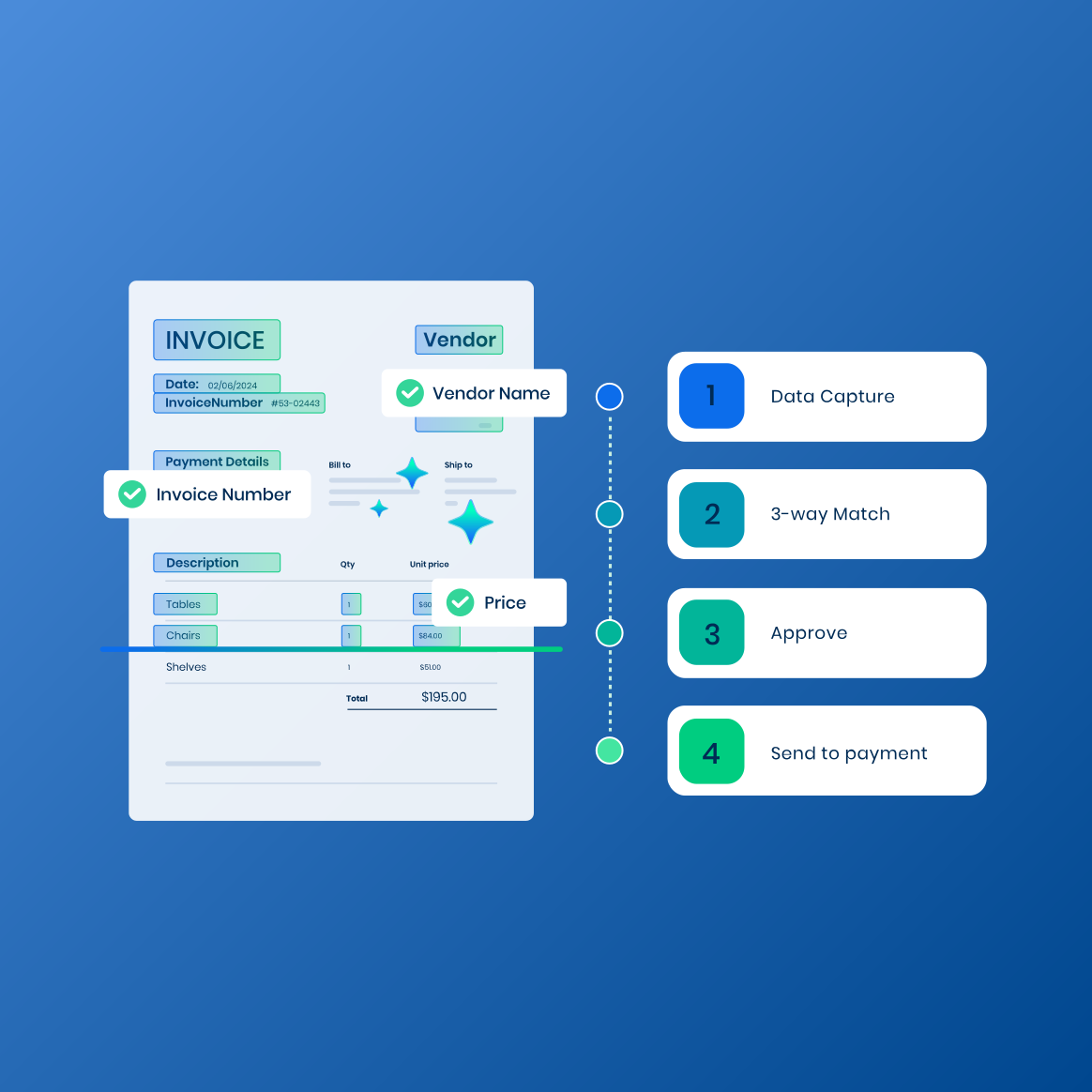
Most “AP automation” is really invoice capture. It scans the PDF and fills in the fields. That’s useful. But your team still codes the invoice, matches it to the PO, works out who should approve it, chases that person, and checks it isn’t a duplicate.
We call this the After-the-Scan Gap: all the work that happens after the invoice is read. It’s where your team’s hours actually go, and it’s exactly what most tools leave behind.
How DOKKA Closes the After-the-Scan Gap
DOKKA doesn’t stop at reading invoices. It puts four AI agents to work on the steps that come after, directly on top of the ERP you already run:
- Invoice Processing Agent. Extracts headers and line items, validates them, and learns your team’s GL coding as it goes, so there’s less to correct every month.
- Approval Agent. Suggests the right approver from your own approval history, sends the reminders and escalates the late ones, so your team stops chasing.
- PO Matching Agent. Runs two- and three-way matching as invoices arrive and shows your team only the lines that don’t add up.
- Document Agent. Keeps every invoice, receipt and approval in one place, flags duplicates before they post, and records who did what.
Your team stops processing invoices and starts reviewing them. Nothing posts to your ledger without your approval, and your ERP stays the system of record.
Don’t Take My Word for It
Here’s what changed for four of the 3,500+ finance teams that use DOKKA today:
“DOKKA learned who should approve transactions from a specific supplier, and it just required a quick review before sending it for approval. This feature has saved us a significant amount of time.”
Craig Brass, Systems Architect, Voneus Broadband
“Compared to our previous highly manual process with limited transparency, this efficiency gain is a game-changer.”
Galit Lin Machloof, VP of Finance, Treetoscope
“DOKKA is incredibly fast, and it works seamlessly. The speed at which I can verify and publish documents is excellent, and the system is extremely easy to use.”
Rochelle Wu, AP Manager, Mud Bay
See it on your AP processLive demo · Live in 2–4 weeks on your current ERP
What I’ll Admit Up Front
DOKKA won’t be perfect on day one. The agents learn from your own data: your coding, your approvers, your suppliers. So in the first weeks your team will correct more than they will a few months in. That’s by design. You stay in control while it learns.
And if you only handle a handful of invoices a month, you probably don’t need us. DOKKA earns its keep when volume is the problem.
The Questions You’re Probably Asking
Will it work with our ERP?
DOKKA connects to NetSuite, SAP Business One, Acumatica, QuickBooks, Priority and more. It syncs in real time, and your ERP stays the system of record. No exports, no second ledger. See all integrations
How long will implementation take?
Two to four weeks on the ERP you already use. Not a six-month project.
Can I trust AI anywhere near my ledger?
You set the approval rules. Nothing posts without sign-off, and every invoice carries a full audit trail of who imported it, what changed and who approved it.
Is our data safe?
DOKKA is ISO 27001 certified and SOC 2 examined, with role-based access and an audit trail on every action. When auditors or IT ask, the answers are already documented.
What happens at month-end?
DOKKA AP connects to DOKKA Close, so clean AP data and auto-generated journals flow straight into your close.
Here’s What I’d Like You to Do Next
Book a live demo with my team. Bring your questions and a rough picture of how invoices move through your AP today. In the demo, we’ll show you:
- Which of your AP steps the agents can take over first, and which ones should stay with your team
- How DOKKA works out who should approve which supplier from your own approval history
- What three-way matching looks like when only the mismatched lines reach your desk
- How a duplicate invoice gets caught before it posts, not after the vendor’s refund email
- How long it would realistically take to go live on your ERP
Book your live AP demo
To a calmer month-end,

Eric Edelstein
Co-founder, DOKKA
P.S. Run the math at the top one more time. Whatever number it showed, your team pays it again next month, and every month after, until something changes. The demo is the quickest way to find out whether DOKKA is that something.
P.P.S. Already comparing vendors? Ask each one what happens after the invoice is scanned. It’s the fastest way to see the difference.