


Automated accounting software is a digital, often cloud-based solution designed to handle repetitive, time-consuming financial processes with minimal manual input. Instead of relying on spreadsheets, emails, and manual data entry, finance teams use automation to capture, process, organize, and post financial data in a faster, more accurate, and more controlled way.
To break down this definition in practical terms, automated accounting software is used to handle processes that take up a lot of time and are repetitive, such as invoice management in the accounts payable workflow, as well as reconciliations, task management, and reporting during the financial close.
At its core, it transforms how finance teams manage documents, workflows, and data, turning them into a streamlined and structured process.
How Automated Accounting Software Works
Automated accounting software connects the full financial workflow, from document intake to final posting, into one structured system. Instead of handling steps across multiple tools or passing files between teams, everything is processed in a single, continuous flow.
It begins with document capture, where invoices, receipts, and other financial documents are collected from channels such as email, uploads, or integrations with suppliers. Once received, documents are automatically organized and stored in a centralized workspace.
Next is data extraction and processing, where key details such as vendor information, amounts, dates, and tax data are identified and structured into accounting-ready formats. This removes manual entry and helps ensure consistent, reliable records.
From there, workflow and approvals are handled automatically. Documents are routed to the appropriate stakeholders based on predefined rules like department, cost center, or amount. Approvers can review and approve directly in the software, which reduces delays and eliminates manual coordination.
Once invoices and transactions are approved, they are posted directly into accounting or ERP systems. As a result, financial data remains synchronized across all platforms.
Accounts Payable (AP) Automation
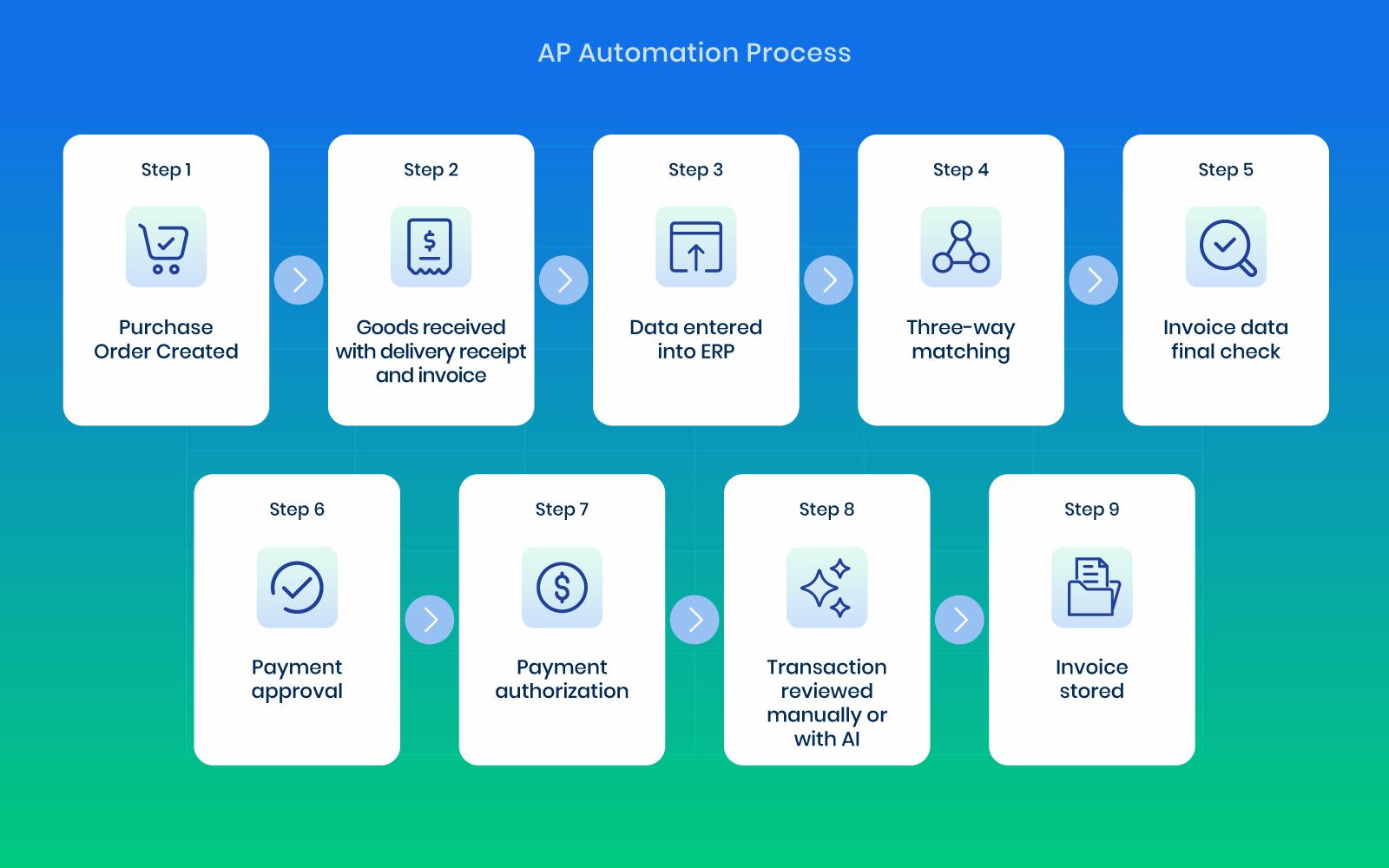
Accounts payable automation streamlines the entire invoice lifecycle, from receipt to payment readiness.
Incoming invoices are captured and validated against business rules and, when relevant, matched with purchase orders or supporting documents. Once verified, they move through structured approval workflows defined by internal controls.
At each step, the software ensures invoices are processed consistently and in line with company policies, reducing the risk of duplicate payments, incorrect coding, or missing documentation. Exceptions can be flagged automatically, allowing finance teams to focus only on cases that require attention.
After approval, invoices are prepared for posting and payment processing, with full visibility into their status at every stage. Teams can track where each invoice is in the process, identify bottlenecks, and maintain control over payment timing. This reduces manual handling, shortens processing time, and improves accuracy and control over outgoing payments.
Over time, this creates a more predictable and scalable AP process that can handle higher volumes without increasing administrative workload.
Financial Close Automation
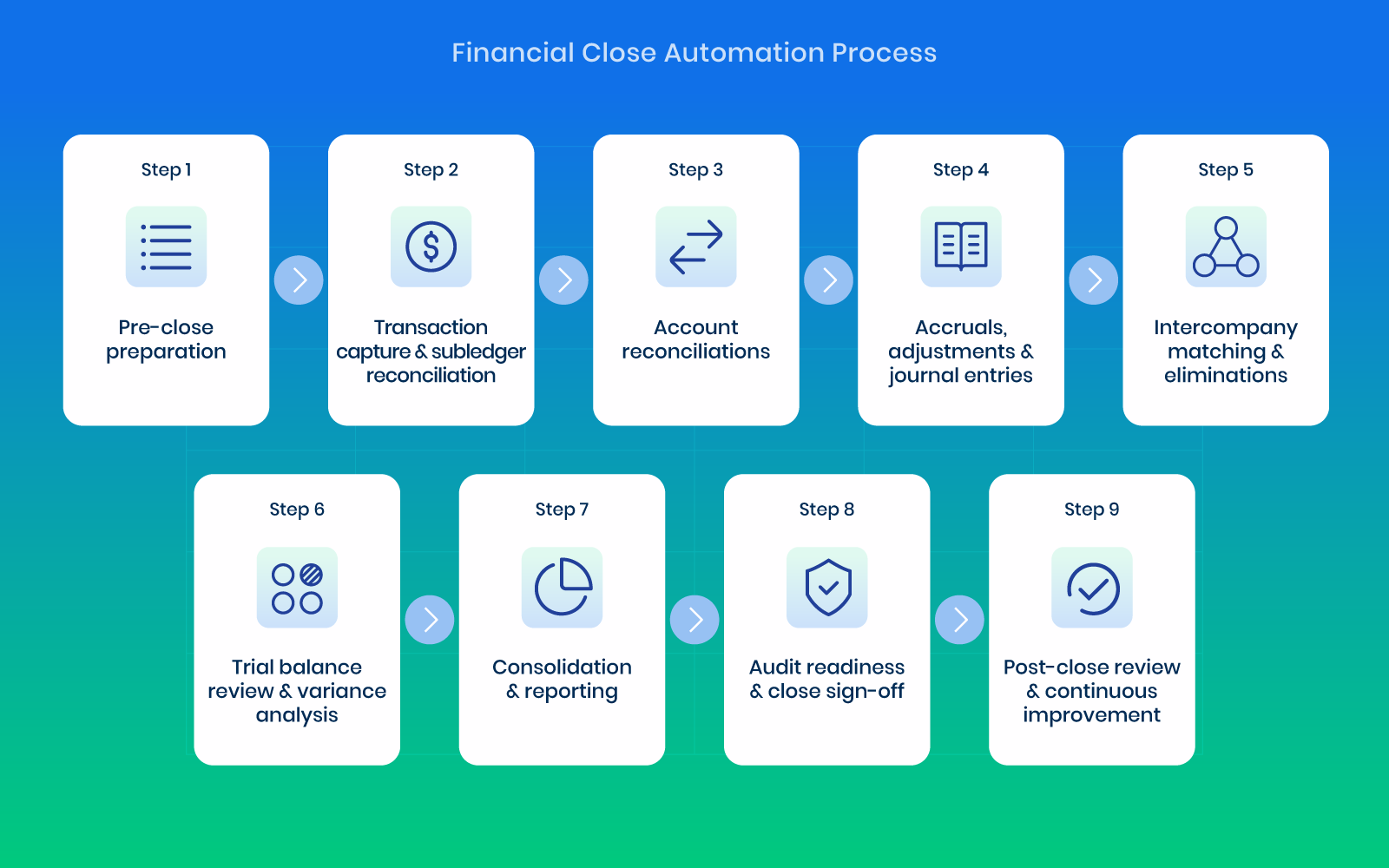
Financial close processes are traditionally time-consuming, involving reconciliations, journal entries, and coordination across multiple teams. With automation, these tasks are organized and streamlined within a single system. Close activities can be structured into clear workflows, ensuring that responsibilities are assigned and deadlines remain visible across the finance team.
Teams can track progress in real time, monitor outstanding tasks, and reduce reliance on manual check-ins or spreadsheet-based tracking. Reconciliations and supporting documentation become easier to access, which helps reduce delays and improves coordination during busy close periods.
That creates a more controlled close process, reduces operational friction, and improves accuracy across reporting periods. It also allows finance teams to identify issues earlier in the cycle rather than only at the final stages of closing.
In practice, the outcome is faster closes, fewer last-minute adjustments, and more reliable financial reporting.
Manual vs. Automated Accounting: What Actually Changes
The easiest way to understand automated accounting software is to compare a normal month with and without it. The work doesn’t disappear, but who does it, and when, changes completely.
| Task | Manual accounting | Automated accounting software |
|---|---|---|
| Invoice entry | Vendor, amount, date and GL code typed from PDFs into the ERP | Headers and line items extracted and coded automatically |
| Approvals | Forwarded by email and chased by hand | Routed by rules, with reminders and escalations sent automatically |
| PO matching | Invoices checked line by line against POs and receipts | Two- and three-way matching in real time, with only exceptions left for review |
| Reconciliations | Built in spreadsheets at month-end | Prepared continuously from ERP data, with discrepancies flagged during the month |
| Journal entries | Recurring entries and accruals rebuilt every period | Generated from templates or source data, then reviewed and posted |
| Documents | Scattered across inboxes, shared drives and filing cabinets | Stored in one searchable workspace, linked to each transaction |
| Audit trail | Reconstructed from emails when auditors ask | Recorded automatically: who did what, when and why |
| Month-end | A fire drill in the first days of the new month | A review of work already prepared during the month |
What Can You Automate in Accounting?
Automated accounting software covers most of the repetitive, rules-based work in a finance department. The processes most teams automate first are:
- Accounts payable: invoice capture, GL coding, approval routing, PO matching, duplicate detection and posting to the ERP.
- Accounts receivable: recurring invoicing, payment reminders and cash application.
- Bank and account reconciliations: matching bank and subledger transactions to the general ledger and flagging differences. See account reconciliation software.
- Journal entries: recurring journals, accruals, prepaids, provisions and intercompany eliminations.
- Expense management: receipt capture, policy checks and reimbursement.
- Financial close: close checklists, task owners and deadlines, flux analysis and consolidation across entities.
- Reporting: P&L, balance sheet, cash flow and management reports generated from live ledger data.
What stays with people is judgment: approving exceptions, explaining unusual movements, making estimates and advising the business. Good automation gives your team more time for that work, rather than trying to replace it.
Technologies Behind Automated Accounting Software
Automated accounting software solutions available today combine several different technologies to handle documents, data, and workflows with minimal manual effort. They do not rely on a single capability. Instead, they integrate multiple layers of automation to create a smooth and structured accounting process.
Key technologies present in automated accounting software include:
- Artificial Intelligence (AI): Enables the software to interpret documents, suggest account coding, detect anomalies, and automate decision-making across workflows. AI reduces the need for manual review and improves overall efficiency.
- Machine Learning: Continuously improves performance by learning from user actions. For example, it can recognize how specific vendors are handled or how transactions are categorized, then apply that logic automatically over time.
- Optical Character Recognition (OCR): Converts invoices, receipts, and other documents into readable digital data. Information can be captured from PDFs, scans, or images without manual entry.
- Intelligent Data Extraction: Goes a step further than text recognition by identifying and structuring key fields such as vendor names, invoice numbers, amounts, and tax data, making them immediately usable in accounting workflows.
- Workflow Automation: Control how documents move through the organization. Approval rules, routing logic, and task assignments are predefined, which helps ensure consistency and compliance with internal policies.
- Cloud-Based Infrastructure: Stores all documents and financial data in a centralized and secure environment. Teams gain real-time access, along with scalability and easier collaboration across locations.
- In-Platform Collaboration Tools: Allow teams to communicate directly within the context of documents through comments and notes, creating a clear audit trail of decisions and approvals.
- ERP and System Integrations: Connect accounting software with other business systems, ensuring data flows automatically between tools without duplication or manual transfer.
Together, these technologies create a system where documents are captured, data is structured, workflows are enforced, and financial information moves smoothly from one step to the next.
From Rules to AI Agents: How Accounting Automation Is Changing
Accounting automation has moved through three stages, and the tools on the market today sit at different points along that path:
- Rules-based automation: fixed rules and templates, such as “route every invoice over $5,000 to the CFO.” Reliable, but every exception needs a person and every new vendor layout needs a new template.
- AI-assisted automation: machine learning reads documents of any layout and suggests GL codes or approvers based on past decisions. People still drive each step, with fewer keystrokes.
- AI agents: software agents that carry out a whole task, such as processing an invoice from capture to posting, or preparing a reconciliation with supporting evidence, and hand the result to a person to review. Your team moves from doing the work to approving it.
When you evaluate tools, ask which of these stages each feature actually belongs to. “AI-powered” on a website can mean anything from better OCR to agents that complete work end to end.
Types of Automated Accounting Software (With Examples)
There is no single “automated accounting system.” Most finance teams combine a core ledger with specialist tools that automate the work around it:
- Core accounting and ERP systems hold the general ledger and include basic automation such as bank feeds and recurring entries. Examples: QuickBooks, Xero, NetSuite, SAP Business One, Acumatica and Microsoft Dynamics 365.
- AP automation software takes over invoice capture, coding, approvals and matching, then posts to the ERP. Examples: DOKKA AP, Stampli, Tipalti and AvidXchange. See how they compare in DOKKA vs Stampli and DOKKA vs Tipalti.
- Financial close automation software manages the close checklist and automates reconciliations, journal entries and flux analysis. Examples: DOKKA Close, FloQast, BlackLine and Numeric. Compare them in DOKKA vs FloQast and DOKKA vs BlackLine.
- Expense management software captures receipts and card spend and checks them against policy.
- AR and billing automation handles invoicing, collections and cash application.
- FP&A and CPM platforms automate budgeting, forecasting and, in larger enterprises, consolidation.
For mid-market teams, the biggest time savings usually come from AP and the financial close, because those processes combine high volume with heavy manual work. Platforms that cover both on one system also avoid a second integration with the ERP.
20 Ways Automated Accounting Software Helps Your Business
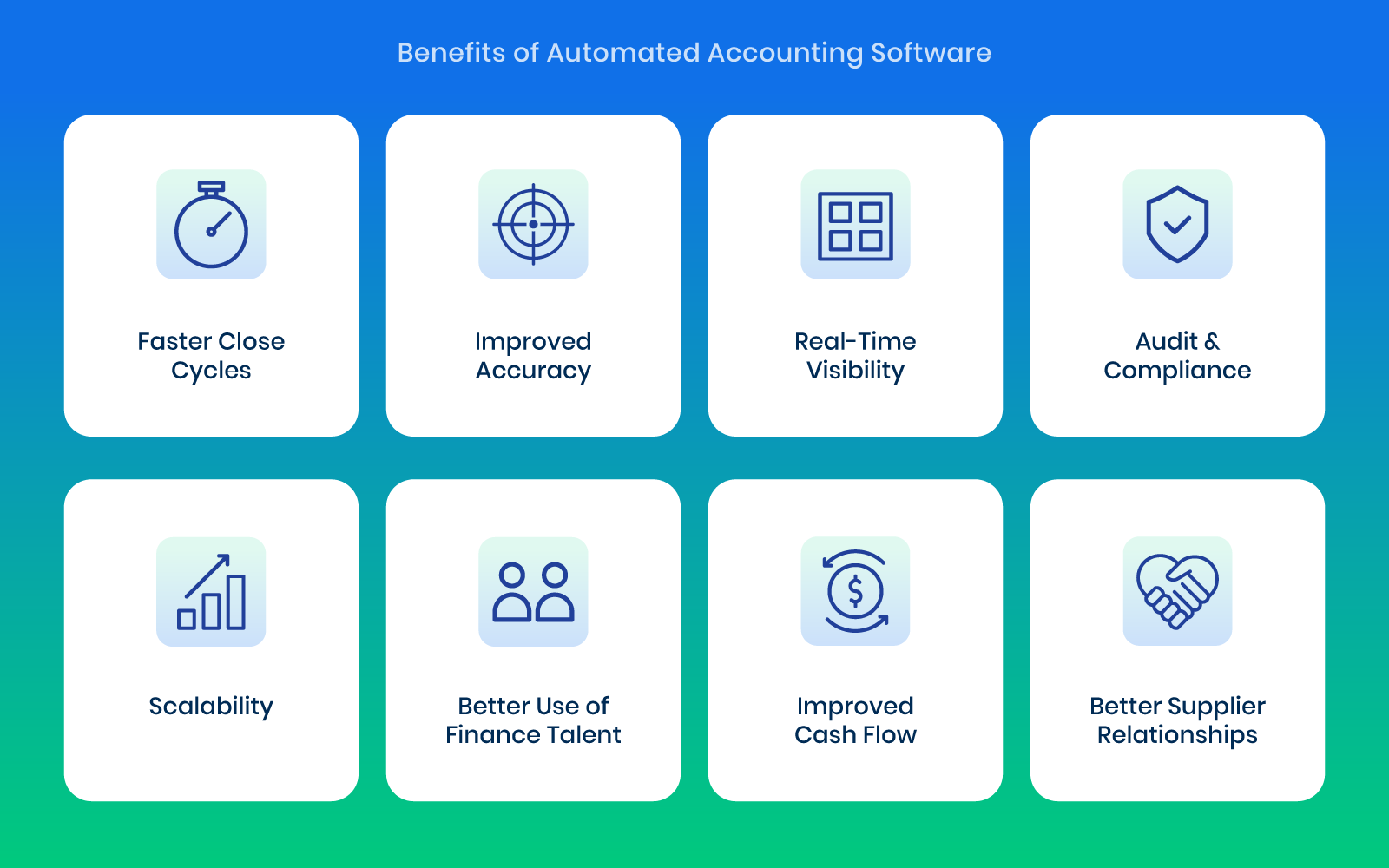
- Saves Time on Data Entry
Manual bookkeeping can take hours every week, especially when dealing with high transaction volumes. Automation eliminates repetitive entry tasks by importing transactions directly from banks, payment systems, and connected apps. Finance teams can then focus on higher-value work like financial analysis and planning instead of repetitive data input.
- Reduces Human Error
Typos, duplicate entries, and missed transactions are common in manual accounting. Automated software reduce these risks by standardizing data capture and processing. Financial records become more reliable, and fewer costly corrections are needed during reconciliation or audits.
- Improves Cash Flow Tracking
With automation, businesses see real-time updates of money coming in and going out. This makes it easier to understand liquidity and anticipate shortages or surpluses. Better visibility helps companies make quicker and more informed financial decisions.
- Automates Invoice Creation
Invoices can be generated automatically based on predefined rules such as recurring services or completed milestones. Billing stays consistent and timely, which reduces delays in revenue collection. It also minimizes the chance of forgetting to invoice clients.
- Speeds Up Payments
Many systems include built-in payment links or integrations with payment gateways. Customers can pay directly from invoices with minimal friction. Faster payments improve cash flow and reduce outstanding receivables.
- Simplifies Expense Management
Receipts and expense documents can be uploaded or scanned and automatically matched to transactions. Manual sorting and filing become unnecessary. Expense tracking and categorization for reporting and tax purposes also become easier.
- Streamlines Bank Reconciliation
Instead of manually comparing bank statements with internal records, the software automatically matches transactions. Reconciliation time drops significantly, and discrepancies are identified more quickly. Financial records remain accurate and up to date.
- Enhances Financial Reporting
Reports such as profit and loss statements, balance sheets, and cash flow summaries are generated instantly. Decision-makers gain up-to-date financial insights without waiting for manual reporting cycles. Financial planning becomes more responsive.
- Supports Tax Preparation
Organized and automatically categorized financial data simplifies tax filing. Businesses can easily access required documents and summaries when preparing returns. Stress during tax season decreases, along with the risk of filing errors.
- Ensures Regulatory Compliance
Automated accounting software are often updated to align with local tax laws and accounting standards. Businesses can stay compliant without constantly monitoring regulatory changes. The risk of penalties or compliance issues is reduced.
- Provides Real-Time Insights
Dashboards offer live visibility into key financial metrics such as revenue, expenses, and profit margins. Business owners can understand performance at any moment. Faster strategic decisions become possible based on current data.
- Improves Budgeting Accuracy
Access to historical data and real-time trends allows businesses to create more realistic budgets. Spending patterns and revenue cycles become clearer through automation. Financial planning improves, with fewer budget surprises.
- Automates Invoice Approval Workflows
Invoices can be automatically routed to the right managers or departments based on predefined approval rules. Manual forwarding is no longer necessary, which reduces delays in the approval chain. Spending also remains aligned with internal controls and authorization policies, strengthening financial governance.
- Enables Multi-Currency Support
For businesses operating internationally, automated software handle multiple currencies seamlessly. Real-time exchange rates are applied, and transactions are converted automatically. Global accounting becomes simpler and conversion errors decrease.
- Integrates with ERPs
Modern accounting automation tools connect directly with Enterprise Resource Planning (ERP) systems. Financial data flows smoothly between accounting, procurement, inventory, and operations. Data silos are removed, creating a unified view of business performance across departments.
- Strengthens Financial Security
Cloud-based solutions use encryption, authentication, and secure access controls to protect sensitive financial data. Risks related to unauthorized access or data loss are reduced. Regular backups also ensure recovery if needed.
- Reduces Accounting Costs
Automation reduces repetitive manual work, which can lower the need for extensive bookkeeping hours or outsourced accounting services. Operational expenses decline over time. Finance teams gain more time for strategic work.
- Improves Collaboration
Multiple users such as accountants, managers, and business owners can access the same real-time financial data. Communication becomes smoother, and delays caused by outdated information are reduced. Everyone works from a single source of truth.
- Helps Detect Fraud and Anomalies
Automated software flag unusual transactions or patterns that deviate from normal behavior. Potential fraud or errors can be identified early. Early detection lowers financial risk and strengthens control.
- Supports Business Growth
Automation reduces manual accounting workload, freeing up time and resources for growth activities. Leadership can focus more on strategy, expansion, and customer development instead of administrative tasks. This scalability makes automation especially valuable for growing companies.
How to Choose Automated Accounting Software
Feature lists look similar across vendors. These questions separate the tools that will actually remove work from the ones that only digitize it:
- Does it integrate natively with your ERP? Look for two-way sync of vendors, GL accounts, dimensions and POs, not CSV exports. Check your exact ERP on the vendor’s integrations page.
- Does it do the work, or just capture data? Ask what happens after an invoice is read: is coding, matching and routing automatic, or does your team still handle each step?
- Does it learn from your team? AI that learns your coding and approval patterns gets more accurate every month. Static rules don’t.
- Who stays in control? You should be able to set approval rules, review entries before they post, and see a full audit trail for every document and change.
- Does it cover AP and the close? If both are pain points, one platform means one integration, one audit trail and clean AP data flowing straight into accruals and reconciliations.
- How long is implementation? Mid-market tools should go live in weeks. Months-long projects with implementation partners are a sign the product was built for enterprises.
- Is it secure? Ask for ISO 27001 certification and a SOC 2 Type II report, plus role-based access controls.
- How is it priced? Understand whether you pay per user, per document or per module, and what happens as your volume grows.
How to Implement Automated Accounting Software
Most implementations follow the same five steps:
- Map your current process. Document how invoices, approvals and close tasks move today, and where the delays and errors happen.
- Start with one high-volume process. AP is usually the best first step, because the time savings are immediate and easy to measure.
- Connect your ERP and set your rules. Sync your chart of accounts, vendors and dimensions, then configure approval rules and coding defaults.
- Run in parallel, then switch. Process real documents alongside your current method until the team trusts the results.
- Expand and measure. Extend automation to reconciliations, journal entries and the close, and track the metrics below every month.
How to Measure the ROI of Accounting Automation
Track a few metrics before you start and every month after go-live:
- Cost per invoice: total AP cost divided by invoices processed.
- Invoice cycle time: days from receipt to approval.
- Touchless rate: the share of invoices processed without manual edits.
- Days to close: business days from period end to closed books.
- Post-close adjustments: entries made after the books were closed.
- Audit preparation time: hours spent pulling evidence for auditors.
- Volume per team member: invoices or entities handled per person as the business grows.
Together these show whether automation is saving time, improving accuracy, and letting the team absorb growth without adding headcount.
From Manual Processes to a Connected Accounting Workflow With DOKKA
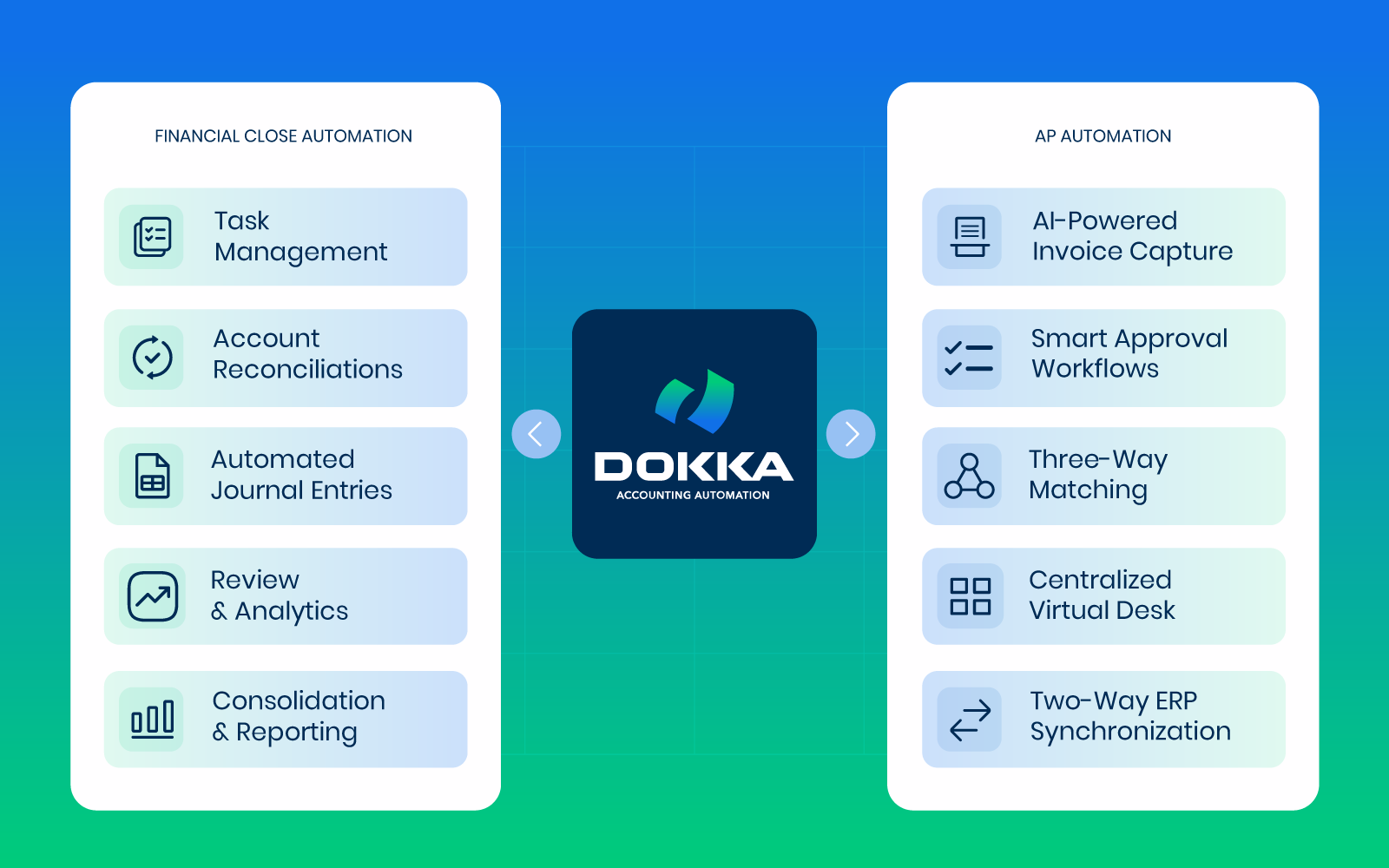
DOKKA centralizes documents, automates data extraction, and connects approval workflows with accounting systems in one platform. It is built to streamline accounts payable and financial close processes while maintaining full control and traceability.
DOKKA is trusted by 3,500+ finance teams in 14+ countries. Customers report up to 80% faster accounts payable and up to 70% less time spent on the close, and most teams go live in weeks on the ERP they already use, including NetSuite, SAP Business One, Acumatica, Microsoft Dynamics 365, QuickBooks, Xero, Sage and Priority.
With DOKKA, finance teams can:
- Centralize all financial documents in one place
- Automate invoice processing and approvals
- Reduce manual work in accounts payable
- Improve visibility and control over workflows
- Streamline month-end and close processes
- Maintain accurate, audit-ready financial records
The result is a more efficient and scalable finance function, without adding operational complexity.
To see how this works in practice, explore real-world examples of how companies use DOKKA to improve their accounting workflows:
Or book a demo to see DOKKA in action and understand how it fits into your finance workflow.
Automated Accounting Software: FAQ
What is automated accounting software?
Automated accounting software uses AI, machine learning, OCR and workflow rules to handle repetitive accounting tasks, such as invoice processing, approvals, reconciliations, journal entries and reporting, with minimal manual input. It connects to your ERP or accounting system so data is captured once and flows through automatically.
What is the difference between accounting software and automated accounting software?
Traditional accounting software records transactions that people enter. Automated accounting software captures, codes, matches and routes those transactions itself, so your team reviews and approves the work instead of keying it in.
Can accounting be fully automated?
Most repetitive tasks can be, but not judgment. Estimates, exception handling, explaining variances and advising the business still need accountants. The goal is to automate the preparation so people can focus on review and analysis.
Will automated accounting software replace accountants?
No. It changes their work. Instead of data entry and spreadsheet reconciliations, accountants spend more time on review, controls, analysis and planning, and the same team can handle more volume as the business grows.
Is automated accounting software secure?
Reputable vendors use encryption, role-based access and full audit trails, and hold certifications such as ISO 27001 and SOC 2 Type II. Always ask for these before sharing financial data. DOKKA is ISO 27001 certified and SOC 2 Type II examined.
How long does it take to implement?
It depends on scope and on the vendor. Mid-market AP automation typically goes live in two to four weeks, and close automation in about a month. Enterprise platforms that need implementation partners can take several months.
Which processes should I automate first?
Start with accounts payable. It has the highest volume of repetitive work and the fastest, most measurable payback. Once AP is automated, extending automation to reconciliations and the month-end close builds on the same clean data.




