Account reconciliation software is a digital platform that automates, streamlines, and centralizes the process of validating account balances at month-end. These solutions enhance accuracy, reduce manual effort, and help finance teams maintain compliance through standardized workflows.
Key capabilities typically include:
- Automated data extraction from ERPs, banks, and financial systems
- Matching and variance analysis powered by rules or AI
- Task and workflow automation to manage approvals, close tasks and adjusting journal entries
- Centralized documentation and audit trails
- Real-time dashboards and reporting
- Integration with all major finance systems
The purpose is straightforward: reduce manual work, enable faster and more reliable month-end closes, and provide finance leaders with clarity and control over their financial data.
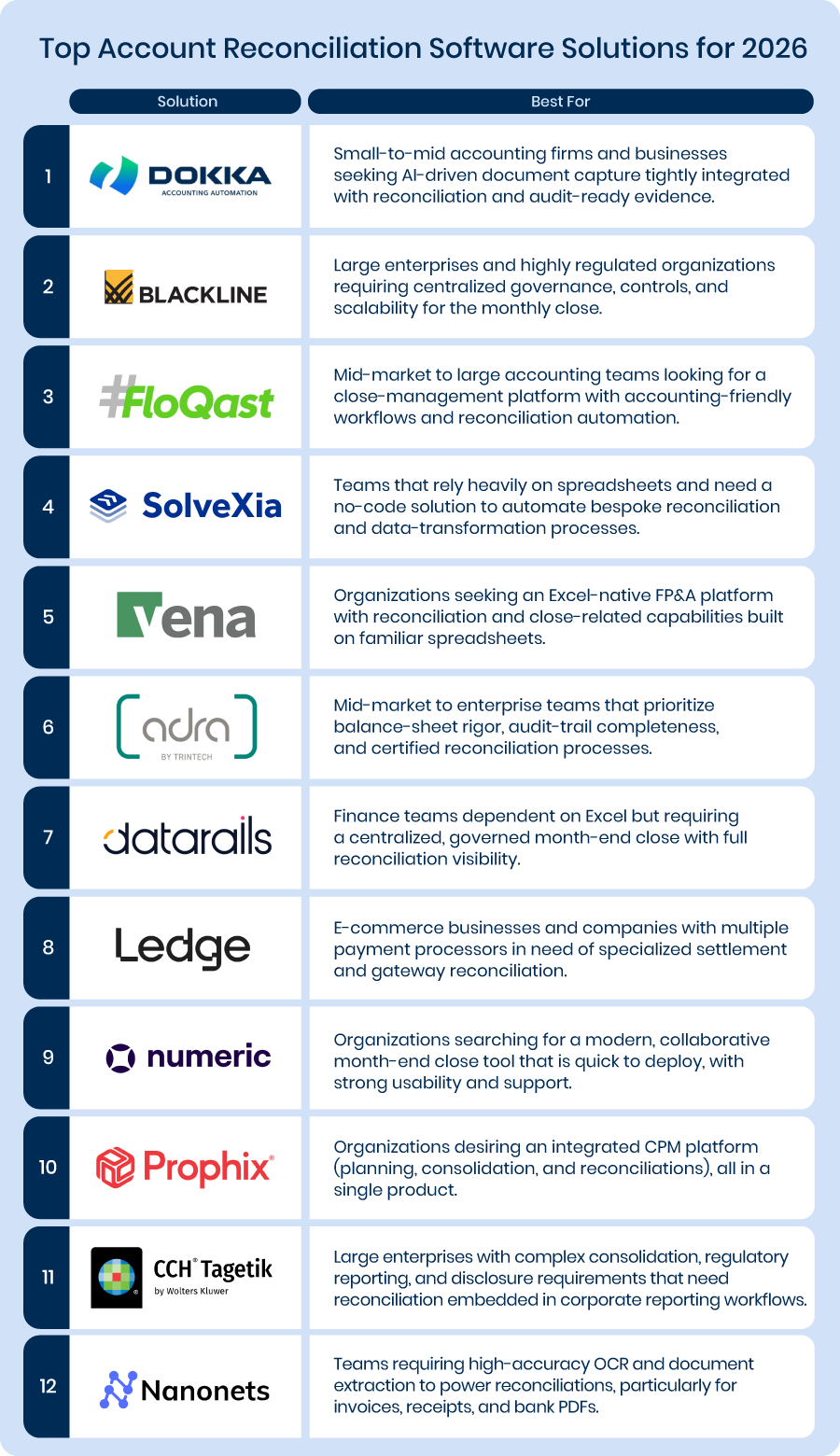
Now, let’s compare the best account reconciliation software platforms for 2026.
12 Best Account Reconciliation Tools
- DOKKA
- Blackline
- Floqast
- Solvexia
- Vena
- Adra by Trintech
- Datarails
- Ledge
- Numeric
- Prophix
- CCH Tagetik
- Nanonets
1) DOKKA
Best for: Mid-sized finance teams that need high-accuracy, high-volume GL reconciliations with intelligent matching and faster exception resolution.
Overview:
DOKKA removes the friction from modern GL reconciliations by automating the most error-prone parts of the process: matching, variance detection, and exception handling.
Instead of relying on fragile spreadsheet logic or manual comparisons, DOKKA auto-matches transactions across systems, entities, and currencies with unmatched accuracy. Discrepancies are surfaced immediately, not buried at month-end, allowing teams to resolve issues earlier and close faster.
By combining intelligent matching, configurable variance rules, and real-time collaboration, DOKKA shortens the reconciliation cycle while improving confidence in the numbers.
Key Features:
- High-volume automated matching: Automatically matches transactions across GLs, subledgers, banks, and external systems—even across entities and currencies.
- Intelligent exception management: Highlights discrepancies, unmatched items, and variances with clear explanations and prioritization.
- Configurable thresholds & variance rules: Reduce noise and false positives by defining materiality thresholds and tolerance rules per account or reconciliation type.
- Collaborative reconciliation workflows: Assign, comment, and resolve exceptions in real time—without email chains or offline trackers.
- Centralized reconciliation dashboard: Monitor reconciliation status, risk, and outstanding issues across all accounts from a single view.
Differentiation:
DOKKA approaches reconciliations as a continuous, intelligent process—not a month-end scramble. By combining automated matching, contextual AI, and collaborative workflows in one platform, DOKKA delivers faster reconciliations with fewer exceptions and less manual effort.
Unlike tools that focus only on reporting or checklist completion, DOKKA actively reduces reconciliation work by preventing mismatches and surfacing issues early.
Pros:
- Highly accurate matching across large transaction volumes
- Significant reduction in manual reconciliation effort
- Clear, auditable exception handling and resolution
- Centralized visibility across accounts, entities, and teams
- Strong ERP integrations that scale with complexity
Cons:
- Advanced analytics and reporting customizations are still evolving
- Initial setup of matching rules and thresholds may require implementation support
2) BlackLine
Best for: Large enterprises and highly regulated organizations requiring centralized governance, controls, and scalability for the monthly close.
Overview:
BlackLine is widely regarded as an enterprise standard for financial close automation. The platform is built to support multi-entity, multi-currency organizations with robust controls, segregation of duties, and an emphasis on auditability.
BlackLine is most often adopted by organizations that need a single source of truth for reconciliations, intercompany eliminations, journal entries, and task orchestration across many accounting teams and departments. The system is designed to replace sprawling spreadsheets and point solutions with a governed, auditable cloud platform.
Key Features:
- Central reconciliation repository: A controlled, searchable place for every reconciliation — certified and versioned.
- Automated matching and exception identification: Automates routine matches and surfaces anomalies for human review.
- Intercompany and consolidated close capabilities: Manages intercompany reconciliation workflows and supports large-scale consolidation processes.
- Controls and audit trail: Detailed logs, certification processes, and role-based access.
Differentiation:
BlackLine’s value lies in its enterprise architecture: scale, compliance, and a mature ecosystem. The platform is built for complex environments where reconciliations must align with internal controls, external audit requirements, and cross-border accounting rules. Integrations with major ERPs and strong governance features make it a frequent choice for finance organizations that prioritize control over speed of initial deployment.
Pros:
- Excellent for standardizing processes across many entities and regions.
- Strong governance reduces audit cycles and compliance headaches.
- Proven at scale in large, multi-division companies.
Cons:
- Implementation can be resource-intensive and requires change management.
- Smaller teams often find the breadth of BlackLine unnecessary and the cost disproportionate.
3) FloQast
Best for: Mid-market to large accounting teams looking for a close-management platform with accounting-friendly workflows and reconciliation automation.
Overview:
FloQast built its reputation on optimizing the accountant’s day-to-day close experience. The platform wraps reconciliations, task lists, and collaboration tools into a workflow that mirrors how accounting teams already operate, while replacing email threads and spreadsheet checklists with centralized documentation, clearer ownership, and automated matching where appropriate.
Key Features:
- Close checklists and task orchestration: Centralizes responsibilities and deadlines to strengthen accountability.
- AI-assisted matching and reconciliation support: Reduces manual line-by-line work by proposing matches and highlighting likely exceptions.
- Integration with ERPs and reporting tools: Keeps reconciliations tied to underlying ledgers and financial reporting systems.
- Collaboration and review workflows: Allows reviewers to leave notes, request clarifications, and certify reconciliations.
Differentiation:
FloQast places significant emphasis on the human workflow — how accountants organize, review, and certify work. That emphasis makes it a strong choice when culture and minimal disruption matter, as teams gain automation without losing the mental model they associate with spreadsheets.
Pros:
- Fast adoption due to accountant-centric design.
- Reduces repetitive work with AI matching without requiring a major process redesign.
- Strong collaboration features for reviewers and preparers.
Cons:
- For extremely high-volume, fully automated matching across millions of lines, a specialist matching engine or enterprise tool may deliver greater efficiency.
- Some users report occasional sync or performance lags depending on ERP connectivity and data volumes.
4) Solvexia
Best for: Teams that rely heavily on spreadsheets and need a no-code solution to automate bespoke reconciliation and data-transformation processes.
Overview:
Solvexia offers a no-code automation environment that is especially useful for finance teams who depend on highly customized spreadsheet processes.
Instead of forcing teams to adopt a rigid reconciliation product, Solvexia allows accountants to model their existing processes in a configurable way — pulling data from multiple sources, applying business rules, and creating exception workflows — all without coding. The approach creates a useful bridge for teams that want automation but must preserve unique, non-standard reconciliation logic.
Key Features:
- No-code workflow builder: Create extract-transform-load (ETL) flows and reconciliation logic without programmers.
- Custom matching rules and exception handling: Define the rules your process needs, including complex transforms.
- Scheduling and process automation: Run recurring reconciliation steps and data pulls automatically.
- Analytics and reporting: Track process health and reconciliation metrics.
Differentiation:
Solvexia’s niche is flexibility. Where many reconciliation tools require you to conform to their matching logic, Solvexia asks you to model your logic within a no-code environment. That capability is particularly valuable when reconciliations are idiosyncratic and cannot be solved by out-of-the-box templates.
Pros:
- Extremely flexible automation capabilities
- Good for handling unusual data structures
- Strong processing performance
- Able to scale across varied departments
Cons:
- Interface is more technical than other tools
- Requires time to design and test rules
- Not as user-friendly for smaller teams
5) Vena
Best for: Organizations seeking an Excel-native FP&A platform with reconciliation and close-related capabilities built on familiar spreadsheets.
Overview:
Vena’s philosophy is to modernize planning and analysis without forcing Excel power users to abandon their toolset.
The platform centralizes data and controls behind an Excel interface, allowing teams to continue working in spreadsheets while benefiting from a governed data layer, collaboration features, and add-ons that support reconciliation and close processes. Vena reduces version control problems and improves data lineage while maintaining the familiar Excel interface.
Key Features:
- Excel-native interface with centralized data model: Maintains Excel as the UI while eliminating siloed spreadsheets.
- Data integrations: Connects to ERPs and source systems so reconciliations can be performed against a single data source.
- Planning and close orchestration: Combines FP&A workflows with month-end close tasks and reconciliation tracking.
Differentiation:
Vena’s strength lies in minimizing disruption for Excel-dependent teams: users get a centralized, controlled engine under the hood while preserving Excel formulas, layouts, and templates. For organizations where reconciliation logic is tightly tied to Excel models, Vena provides governance without removing spreadsheet flexibility.
Pros:
- Easy for Excel users to adopt
- Combines planning, reporting, and reconciliation
- Flexible workflow management
- Strong training and onboarding materials
Cons:
- Reconciliation module is not as advanced as dedicated platforms
- Requires disciplined Excel use for best results
- Can become complex in larger deployments
6) Adra by Trintech
Best for: Mid-market to enterprise teams that prioritize balance-sheet rigor, audit-trail completeness, and certified reconciliation processes.
Overview:
Adra is designed to automate balance-sheet reconciliations with a strong emphasis on controls, certification, and visibility. It provides reconciliation templates, roll-forward capabilities for recurring items, and alerts when balances change after certification.
The platform aims to maintain a clean audit trail and to give accounting teams confidence that monthly balances are accurate and fully documented.
Key Features:
- Balance-sheet reconciliation automation: Templates and workflows for standard balance-sheet accounts.
- Certification and roll-forward: Supports certified reconciliations and carries forward long-lived reconciling items with clear visibility.
- Audit trail and change alerts: Notifies users if certified items are modified and stores evidence for auditors.
Differentiation:
Adra’s focus centers on process integrity. Whereas some tools optimize speed or user experience, Adra emphasizes accountability and traceability — essential for organizations that must demonstrate rigorous controls and clear, verifiable evidence of review.
Pros:
- Clear workflows and easy-to-follow processes
- Well-suited for compliance-driven teams
- Scalable without added complexity
- Solid matching engine
Cons:
- Limited customization options
- Interface can feel dated
- Implementation sometimes slower than expected
7) Datarails
Best for: Finance teams dependent on Excel but requiring a centralized, governed month-end close with full reconciliation visibility.
Overview:
Datarails centralizes Excel-based reporting and reconciliations by connecting spreadsheets to a governed data warehouse. It helps teams eliminate version control issues while maintaining the familiar spreadsheet experience.
Datarails also provides close-tracking features, allowing teams to see where reconciliations and other month-end tasks stand in real time.
Key Features:
- Excel-first reporting with centralized data: Securely connect spreadsheets to a single source of truth.
- Month-end close trackers: Dashboards and task management for reconciliations and close activities.
- Templates and integration tools: Map common reconciliation templates into a centralized platform.
Differentiation:
Datarails acts as a bridge rather than a replacement. If a team’s expertise and processes are entrenched in spreadsheets, Datarails preserves that front-end while removing the fragility associated with email-driven spreadsheets and local file copies.
Pros:
- Familiar Excel-like modeling
- Excellent for FP&A teams
- Reduces manual consolidation work
- Provides solid analytics features
Cons:
- Not primarily built for reconciliation
- Setup can be time-consuming
- Matching rules are not as automated as other tools
8) Ledge
Best for: E-commerce businesses and companies with multiple payment processors in need of specialized settlement and gateway reconciliation.
Overview:
Ledge was developed to address a common challenge in modern commerce: the mismatch between orders, payment processor settlements, and how those flows are recorded in the GL.
It focuses on reconciling payments across gateways, marketplaces, and processors, handling multi-leg settlements, fees, refunds, and split settlements so teams don’t have to manually trace every platform remittance back to the ledger.
Key Features:
- Multi-gateway reconciliation: Collects and normalizes feeds from gateways and marketplaces.
- Rules-based matching for settlements and fees: Automates fee allocation, multi-leg settlements, and adjustments.
- Real-time or near real-time reporting: Helps treasury and operations teams quickly identify shortfalls and timing mismatches.
Differentiation:
General reconciliation tools attempt to serve all accounts, while Ledge specializes in commerce payment complexity. It understands the unique patterns of processor settlements, merchant fees, and marketplace remittances—areas that general-purpose reconciliation tools often don’t handle as elegantly.
Pros:
- Modern architecture with strong APIs
- Well-suited for high-volume transaction environments
- Real-time visibility
- Developer-friendly
Cons:
- Less suited for traditional accounting teams
- Requires technical configuration
- Limited broader financial close features
9) Numeric
Best for: Organizations searching for a modern, collaborative month-end close tool that is quick to deploy, with strong usability and support.
Overview:
Numeric emphasizes a modern web UI, collaborative close workspaces, and quick onboarding. The product is designed to help teams complete the month-end close faster by providing visibility into reconciliation status, journal entries, and accountability for each deliverable.
As a newer entrant compared with some legacy vendors, Numeric positions itself around rapid deployment and excellent customer support.
Key Features:
- Central month-end workspace: Tracks reconciliations, tasks, and journal entries in a single location.
- Collaboration tools and comments: Designed for modern accounting teams that rely on asynchronous collaboration.
- Fast onboarding and support: Focused on reducing time-to-value.
Differentiation:
Numeric stands out for its user experience and speed of implementation. Teams looking for a straightforward close tool without heavy technical demands will find that Numeric reduces friction and quickly boosts productivity.
Pros:
- Easy to adopt
- Strong variance insights
- Clean, modern UX
- Good collaboration features
Cons:
- Less robust matching automation
- Not ideal for high-volume reconciliations
- Limited custom workflow options
10) Prophix
Best for: Organizations desiring an integrated CPM platform (planning, consolidation, and reconciliations), all in a single product.
Overview:
Prophix is a corporate performance management vendor with capabilities that span planning, consolidation, and reconciliation. The platform is most effective where the close, forecast, and consolidation processes need to be tightly linked.
Embedding reconciliation into the CPM avoids disconnected systems for planning and close, helping to surface reconciliation-driven adjustments in planning scenarios.
Key Features:
- Integrated reconciliation with consolidation: Reconciliations feed directly into consolidated reporting and disclosures.
- Automation across FP&A and close: Reduces duplicate data entry and improves the accuracy of scenario analysis.
- Dashboards and reporting: Visualize reconciliation health across entities and time periods.
Differentiation:
Prophix’s key differentiator is breadth. The platform emphasizes ensuring reconciliations are part of the broader financial planning and consolidation story rather than being the fastest matching engine.
Pros:
- Comprehensive FP&A suite
- Reliable workflow tooling
- Strong option for growing companies
- Good visualization capabilities
Cons:
- Reconciliation features are not highly automated
- Learning curve can be steep
- User interface may feel outdated to some users
11) CCH Tagetik
Best for: Large enterprises with complex consolidation, regulatory reporting, and disclosure requirements that need reconciliation embedded in corporate reporting workflows.
Overview:
CCH Tagetik (Wolters Kluwer) integrates reconciliation and matching into a broader disclosure and reporting platform. It is often selected by regulated companies that require end-to-end capabilities: reconciliations that tie directly into consolidations, regulatory reports, and disclosures.
Tagetik’s platform is designed to support complex accounting rules, localized reporting requirements, and enterprise-grade data models.
Key Features:
- Transaction matching and reconciliation templates: Built-in patterns for a wide range of reconciliation scenarios.
- Integration with consolidation and disclosure: Strong linkage between reconciled balances and reporting deliverables.
- Compliance and regulatory support: Tools that assist teams in meeting external reporting obligations.
Differentiation:
Tagetik specializes in organizations where reconciliations form part of a larger regulatory and reporting framework. The platform goes beyond simple matching; it ensures reconciled balances feed into the numbers auditors and regulators expect across consolidated reports.
Pros:
- Extremely robust for enterprise environments
- Strong compliance and reporting capabilities
- Supports complex global structures
- Highly configurable
Cons:
- Long implementation timeline
- Expensive for smaller organizations
- Steeper learning curve due to extensive feature set
12) Nanonets
Best for: Teams requiring high-accuracy OCR and document extraction to power reconciliations, particularly for invoices, receipts, and bank PDFs.
Overview:
Nanonets specializes in AI-driven OCR and document understanding. The platform trains models to extract structured data from diverse document types and delivers high-fidelity results to downstream systems.
In reconciliation workflows, Nanonets is frequently used as the front-end capture layer: feed PDFs into Nanonets, receive structured transactions in return, and push those into a reconciliation engine or GL.
Key Features:
- AI model training and custom extraction pipelines: Train models on specific document layouts to enhance accuracy.
- APIs and connectors: Deliver structured extracts to reconciliation engines, ERPs, or data warehouses.
- Scalability for high-volume ingestion: Built to process large batches of documents efficiently.
Differentiation:
Nanonets focuses on teams whose reconciliations are slowed by poor document capture. If low-quality PDFs and images are limiting the data feeding your reconciliation engine, Nanonets addresses that bottleneck without requiring changes to your reconciliation system.
Pros:
- Excellent OCR accuracy
- Fast document capture
- Versatile API
- Useful for automating repetitive data entry
Cons:
- Not a complete reconciliation solution
- Limited financial close features
- Requires integration with other systems
Why DOKKA Is the #1 Account Reconciliation Software for the Mid-Market
DOKKA is built for finance teams that need powerful, accurate reconciliations—without enterprise-grade complexity or cost.
Unlike traditional reconciliation tools designed for large enterprises, DOKKA focuses on removing work, not adding configuration. It unifies AP automation and financial close in one platform, improving data quality upstream and eliminating many reconciliation issues before they ever reach month-end.
DOKKA’s contextual AI automates transaction matching, variance detection, and exception handling with far greater accuracy than rule-heavy systems—while keeping the workflow simple and intuitive. Finance teams work in a familiar, Excel-like environment with built-in approvals, real-time collaboration, and instant access to every supporting document, from invoices and POs to journal entries and audit trails.
The result is faster reconciliations, fewer exceptions, and clearer audit readiness—without long implementations, heavy maintenance, or enterprise pricing models.
For mid-market finance teams that want results, not complexity, DOKKA is the smart choice.
Disclaimer:
All information presented about third-party products, pricing, or features is based on publicly available sources at the time of writing and is intended for general informational purposes only. DOKKA makes no representations or warranties regarding the accuracy, completeness, or correctness of competitor data. All trademarks and brand names are the property of their respective owners. We encourage readers to verify details with the respective vendors before making any purchasing decisions.